Editorial method
Who makes this, how, and why
YoriPrep Editorial focuses each guide on one operating decision a food-service team can use on its next shift.
- Reference material only
- This article is general operating reference material.
- Case scope
- This reference scope is limited to the operating question and illustrative case described in “From AI chat to a sales record: four checkpoints, no passive saving”.
- Calculation limits
- The review formula is “This is a control sequence, not a mathematical prediction. No later-stage outcome is assumed until the operator completes the preceding checkpoint.”; it does not determine a store-specific result without current inputs and context.
- Date markers from linked sources
- 4 linked sources state no date. Undated sources are not treated as current; check each link for its present status.
- Professional decisions
- Tax, employment, food-safety, accounting, and legal decisions need current official guidance or advice from an appropriate qualified professional. This article has not received that professional review.
- Publisher
- YoriPrep Editorial at Uberion selects the topic and is responsible for the scope of sources and examples in each article.
- Method
- Public sources are linked directly, and unsourced figures, percentages, and situations are labelled as illustrative. AI may assist drafting or translation, but advertising is limited to source-checked, curated articles.
- Purpose
- We publish to help readers solve one cost, stock, prep, or team-operations problem, not to mass-produce pages for search traffic.
AI chat prepares a draft sales entry. The amount remains editable, must pass positive-number validation, and becomes a record only after the operator explicitly saves it.
Operator case
“Does mentioning revenue in chat write it to the ledger?”
The conversation and amounts below are fictional. They demonstrate user-controlled entry and do not imply passive detection, background monitoring, or automatic recording.- Moment
- End-of-day sales entry
- Initiation
- Operator asks in chat
- Controls
- Edit amount, validate, explicitly save
If I type “record today’s sales as 850,000 won,” is it saved as soon as the conversation ends?
No. The request opens an editable draft. The operator checks or changes the amount, the product verifies that it is a positive number, and the record is created only when the operator explicitly chooses Save.
Phase 1 · Request a draft
The operator clearly asks to record sales in chat. The product prepares a draft for review; conversation alone does not write a record.
A chat request proposes an entry—it does not silently execute a save.
Phase 2 · Edit and validate
The proposed amount remains editable. Blank text, non-numeric text, zero, and negative values cannot advance as valid sales amounts.
A valid amount must be a positive number confirmed by the operator.
Phase 3 · Save explicitly
Even a valid draft remains pending. The operator must choose Save to create the sales record and can cancel instead.
The operator retains final control over whether a record is written.
Control the draft, validation, and final save
The development preview turns an operator’s chat request into an editable draft, checks for a positive amount, and waits for an explicit Save action. It never records sales passively.
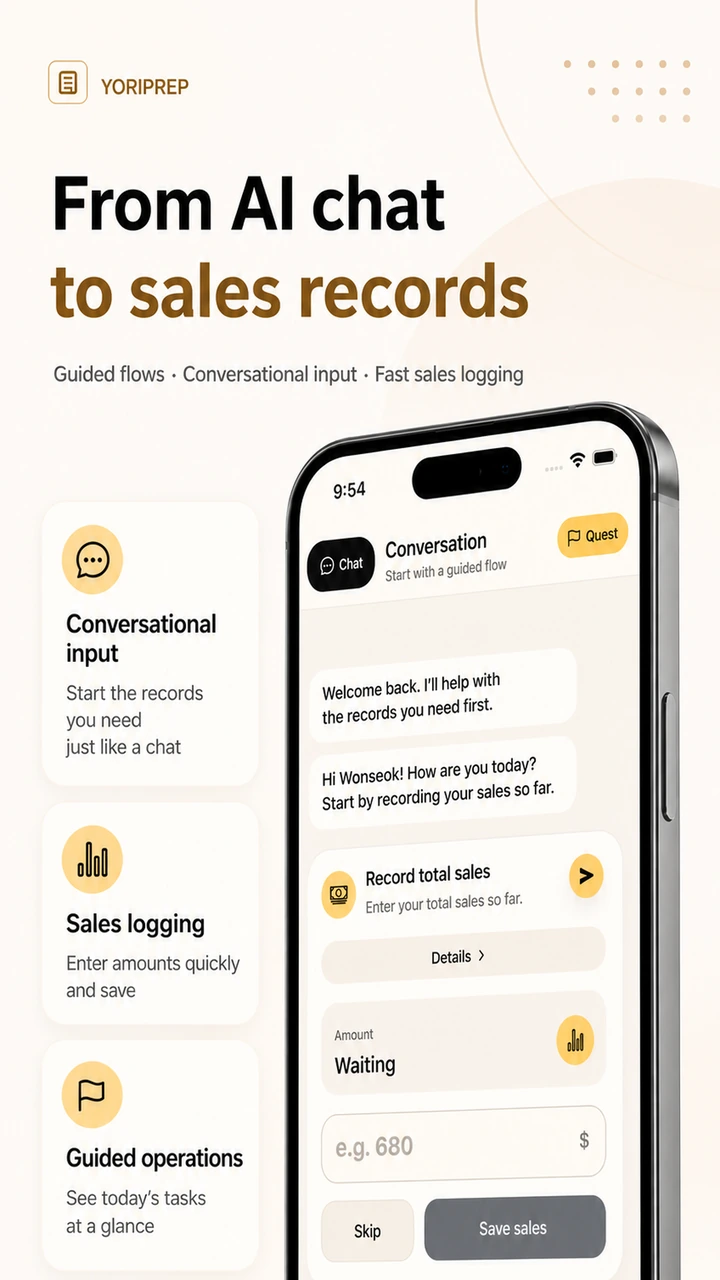
- Ask for a draft
The operator states the recording intent and amount in chat.
- Review the amount
Edit the draft and confirm that validation accepts a positive number.
- Choose whether to save
The operator must explicitly select Save to create the record and may cancel.
Entry rules
Keep four checkpoints distinct
This is a control sequence, not a mathematical prediction. No later-stage outcome is assumed until the operator completes the preceding checkpoint.The conversation creates a draft for review, not a sales record.
The operator corrects the number before saving if it differs from the source total.
Blank, non-numeric, zero, and negative values do not proceed to saving.
A record is written only after the explicit action; the operator may cancel.
Correct an 850,000-won draft to 820,000 won
- Chat request
- Record today’s sales as ₩850,000
- Request initiated by the operator
- Draft amount
- ₩850,000
- Editable and not yet saved
- Corrected amount
- ₩820,000
- Operator aligns it with the receipt total
- Save action
- Operator selects Save
- Explicit action after validation
Chat request → ₩850,000 draft → edit to ₩820,000 → positive validation → SaveOperator-confirmed sales record for ₩820,000The AI did not discover the transaction on its own. The operator requested the draft, corrected it, reviewed validation, and explicitly saved the record.
This development preview assists manual entry. It does not passively detect transactions, monitor conversations for sales, or record revenue without an operator request and explicit save.
Product provenance
What product sources can—and cannot—support
Official sources establish YoriPrep’s product identity and publication record. They do not independently validate AI recognition accuracy or revenue outcomes.YoriPrep
Uberion
Uberion’s product page establishes YoriPrep’s official context as an operations-support product. Product provenance only; it is not independent validation of outcomes.
View sourceYoriPrep on the App Store
Apple App Store
The App Store and Google Play listings establish the current public product record, not inclusion of this development-preview flow in a released build. Product provenance only; it is not independent validation of outcomes.
View sourceYoriPrep on Google Play
Google Play
The App Store and Google Play listings establish the current public product record, not inclusion of this development-preview flow in a released build. Product provenance only; it is not independent validation of outcomes.
View sourceYoriPrep App Review information
Uberion
The App Review information page adds review context but does not independently validate input accuracy or sales performance. Product provenance only; it is not independent validation of outcomes.
View source
Illustrative checkpoints before a record is saved
The values visualize the sequence only. They are not measurements of recognition accuracy, automation, or customer performance.
Operator initiates a recording request
Operator reviews and corrects the draft
Amount must be a number greater than zero
Only the operator’s Save action completes the record
Development preview · fictional entry flow